

iX T21C – C18 BeiJer Electronics
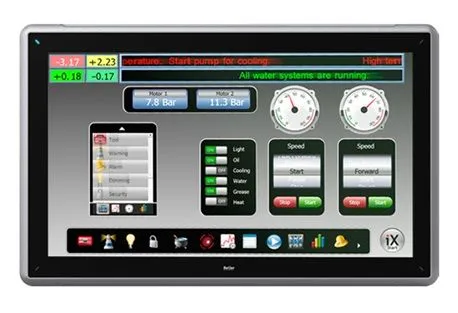
iX T21C – C18 BeiJer Electronics
21.5” graphic touch HMI with iX software
- 21.5″ TFT-LCD touch screen
- 1920 × 1080 (16:9), 16mio. colors, LED backlight
- Intel® Core™ i7-2715QE (4x 2.1 GHz)
- Main memory 2 GB – 4 GB DDR3 (with ECC support)
- Application memory 64GB 2.5“ SSD
- Operating temperature 0 to +50 °C
- CE and UL508 approvals
Facts
General description
| Article number | 100-0051 |
| Part status | Active |
Mechanical
| Mechanical size | 556 x 347 x 87 mm |
| Touch type | Resistive type |
| Weight | 8.1 kg |
| Housing material | Powder coated aluminum |
Power
| Input voltage | +24 VDC (18 – 32 VDC) |
| Power consumtion | 125 W |
| Input fuse | Internal DC fuse, 10A slow |
Display
| Size diagonal | 21.0 inch |
| Resolution | 1280 X 800 pixels |
| Backlight | LED backlight |
| Backlight life time | 50,000 hrs |
| Backlight brightness | 250 cd/m2 |
| Backlight dimming | Industrial |
| Display type | TFT LCD |
Communication serial
| Number of serial ports | 2 Port combined 9pin DSUB with dual pin out |
| Serial port 1 | RS 232 (RTS/CTS) |
| Serial port 2 | RS 485 |
| Serial port 3 | RS 232 |
| Serial port 4 | RS 485 |
Ethernet communication
| Number of ethernet ports | 2 |
| Ethernet port 1 | 1×10/100/1000 Base-T (shielded RJ45) |
| Ethernet port 2 | 1×10/100/1000 Base-T (shielded RJ45) |
Environmental
| Operating temperature | 0 to + 50 °C |
| Storage temperature | -20 to + 70 °C |
| Shock | 10G 11ms half sine |
| Vibration | 0,7G RMS |
| Sealing front | IP65 |
| Sealing back | IP20 |
| Humidity | <85 % non-condensed |
Resources
Drawings
- CAB105 Cable Drawing for TxA / TxB / TxC iX operator panel
- CAB106 Cable Drawing for TxA / TxB / TxC iX operator panel
- CAB107 Cable Drawing for TxA / TxB iX operator panel
- CAB109 Cable Drawing for TxA / TxB / TxC iX operator panel
- T21C Outline Drawing / Panel Cut-Out for iX operator panel
- CAB113: iX TxA/B/C to BFI ModBus RS485
- T15C 3D Drawing iX operator panel
- T21C 3D Drawing iX operator panel
- T12C 3D Drawing iX operator panel
- T15C Outline Drawing / Panel Cut-Out for iX operator panel
- T12C Outline Drawing / Panel Cut-Out for iX operator panel
- CAB102 Cable Drawing for TxA / TxB / TxC iX operator panel
- CAB104 Cable Drawing for TxA / TxB / TxC iX operator panel
- CAB103 Cable Drawing for TxA / TxB iX operator panel
- CAB101 Cable Drawing for TxA / TxB / TxC iX operator panel
- CAB100 Cable Drawing for TxA / TxB / TxC iX operator panel
Certificates
- Declaration of conformity EMC T12C
- Declaration of conformity EMC T15C
- iX TxC DNV A-13686 (PROD CERT – 1030962 – 1 – A1) – 1
- UL Certificate TxC
- UL Certificate TxC series: T12C / T15C / T21C
- Declaration of conformity EMC T21C
- Declaration of conformity EMC ciX-DP
Program examples/Quickstarts
- Start-up document, iX Runtime (KI00336)
- Start-up document, TxC factory reset procedure (KI00325)
- Start-up: IPsec VPN tunnel to iX panel (KI00333)
- Startup Documents CiX-CAN FreeCAN
Product information
- iX_EXTER_E1000_Environmental
Knowledge
- Codesys SoftMotion TxC BIOS settings
- iX – Changning regional settings on a TxC / EPC / PC with Windows 7
- iX – Tutorial – How to setup a SIEMENS S7 ISO-on-TCP Controller in iX
- iX – TxA/TxB/TxC Modbus to Pluto safety PLC
- iX Panel TxA, TxB and TxC, batteries
- TxA / TxB connecting to an old A/AnS/AnU using the Melsec A-Series (CPU) driver
- TxC – Running iX Developer on a TxC
- iX – Delay start of the iX application on TxC, EPC, and iX Runtime machines
- iX – ValidationBuild error: Missing fonts, which are assigned to groups
- IX and animated GIF gives error on validation
- iX 2.0 OPC UA Server
- iX – Alphanumeric keyboard shows a few buttons only
- iX Web Server – FTP does not allow you to edit WebSite files online
- Is it possible to restore an iX-Panel TxC to factory default settings remotely
- Irratic mouse movements on iX/RT TxC when using NMEA 0183 devices
- iX – Transparent Mode Qnn serial through an iX panel with Serial/IP
- Overview – iX panel pixel density and aspect ratio
- TxA/TxB/TxC approximate boot time
- iX – T/TA/TxA/TxB SQL-Client is not avaliable
- iX – How to shutdown PCTxC from within a iX application
- Sketch – connecting a TxA/TxB/TxC to Mitsubishi A/Q C24 RS422 screw terminals.
Manuals
- iX T15C Installation manuals
- iX T21C Installation manuals
- iX T12C Installation manuals
- ciX-DP Mounting instructions iX TxC
- Driver help file for ciX-DP MPI/Profibus DP module
Brochures
- Brochure: iX HMI solution & iX HMI software
Configuration files
- GSD files for ciX-DP Profibus module
| Nhà cung cấp | Chưa cập nhật |
|---|---|
| Xuất xứ | Chưa cập nhật |
Hãy là người đầu tiên nhận xét “iX T21C – C18 BeiJer Electronics”
Bạn phải đăng nhập để gửi đánh giá.


Đánh giá
Chưa có đánh giá nào.